
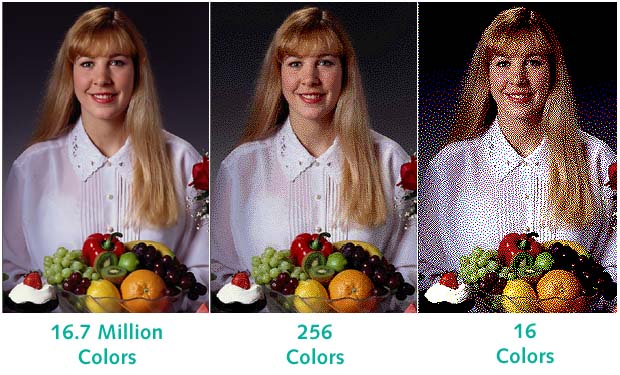
Example image showing how important bit depth is. Although we may not be able to see all 16.7 million colors, we can observe a visual difference between the change to 256, and especially 16 colors. Certain images with fewer colors can benefit from fewer bits, but ones such as the one pictured will only look worse. Image sourced from: http://jakeritchiegraphicdesign.blogspot.com/2015/10/colour-depth.html
In the same way as everything else that’s digital, images are represented as 0s and 1s. But there’s more to it than just simply saying “0s and 1s.” All of the images we see online (unless states otherwise) are represented across 3 channels, which are red, green, and blue or RGB. And depending on how many bits per channel is used, that will be how many colors we see in the given image. The most popular convention is 8 bits per channel, which allows for up to 16 million total colors when combining the three channels. This means there are 24 bits per pixel. In other circumstances, these bits can be reduced, which will reduce the file size at the expense of image quality.
Quality has always been a concern for images, and continues to as cameras and digital screens evolve to capture more detail and colors. The easiest way to discuss quality is when taking pictures using a digital camera and trying to zoom in. While it may visually appear that the object is closer, technically, it is only the pixels of the object becoming larger and taking up more space on the screen. The only proper way to account for zooming in on an image is to use individual lenses, which fortunately many phones have come to adopt. Now, once we have this digital image on a device, whether it is a laptop or mobile device, it has become a digital representation. This means all of the colors are stored in the previously mentioned form of 24 bits where every pixel within the image represents some kind of color value. The quality of said image depends on how many pixels are present in the image with more pixels meaning that there’s more detail, at the expense of storage. Fortunately, many cameras, especially digital ones, provide the user an option for how they would like the image to be saved. For phones the formats will most likely be different, but digital cameras will offer either a RAW format, or a JPEG format. RAW is the most detailed version of an image with no compression concerning storage and JPEG involves some general compressing while maintaining a relatively high quality image. RAW formatted images will take up noticeably more space than the JPEG counterparts.
These quality concerns have carried over into their digitized application on the web as well. Here, we see even more formats that can puzzle those who may not be completely familiar with them. These include GIF, PNG, JPG, WebP, and SVG. Each format has its advantages and possible reasons for being chosen over the others. Starting with GIF, it allows support for animation. This comes at a heavy cost of quality with the file being reduced to only 256 total colors. Based on the image content, certain things may qualify better as a GIF than others. PNG is a relatively newer format with the added feature of being lossless. This means that you are able to modify these images while maintaining their original quality. JPG is one of the older but still popular file formats. It allows for scalable image compression and 60-70% is considered to be a good mix of file size and quality. The drawback with JPG’s, however, is that they are lossy which unlike PNG’s, they will lose some quality after being edited and exported each time. WebP is the newest format, created by Google which seeks to combine the features from GIF and PNG. It supports animation with lossy and lossless compression based on the desired application. It is so new that it is still in the process of being supported by a small fraction of browsers in use today. Lastly, SVG is of it’s own vector based format. This differs from the bitmap formats the other formats use because SVG is not pixel based but vector based. Vector based means instructions are used to properly draw the image each time it’s used. This makes SVG format easily scalable for almost any application. The drawback, however, is that these are not supported by every platform and they may be converted to a bitmap equivalent that may lose some of its original functionality.
Overall, image quality has always been of extreme importance. The fact that it can be a digital representation is something so powerful because it allows for things to be seen that may not have been possible in any other way. And to make these look as realistic as possible, quality must be upheld while also understanding limitations such as file sizes and internet speeds. By being able to uphold quality and keeping file sizes down, images can be very accessible for almost anyone with a stable internet connection.